Android 10 to 15 • Zero Root Required • 100% Ad-Free Overlay

Real-Time In-Game FPS & Silicon Telemetry

Monitor live frame rates, detect frame-pacing hitches with a 200-sample frametime waveform, and track CPU, GPU, thermal, and battery wattage inside a sleek floating HUD built for mobile gamers.
Zero Accessibility API Abuse 100% In-Memory Local Telemetry Native C++ NDK + Kotlin
Verified Store Showcase
Play Store Ready
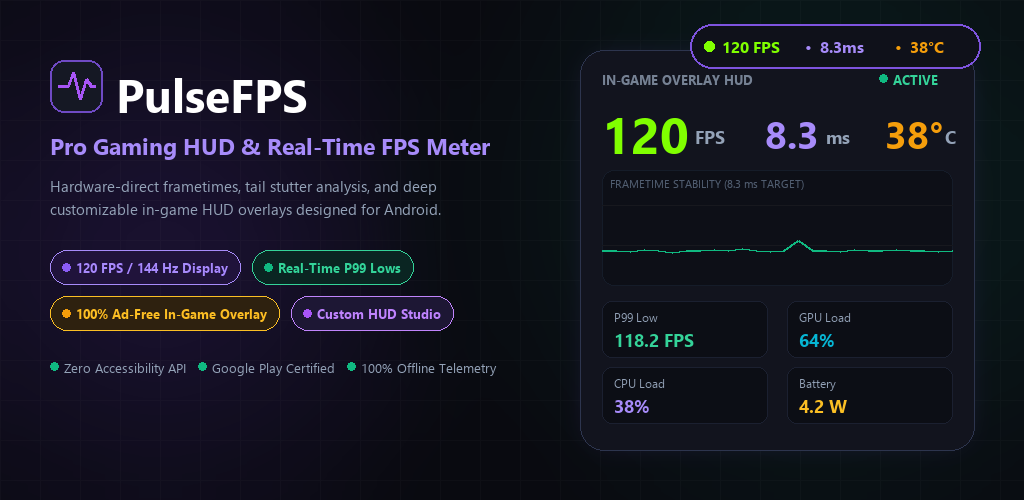
PulseFPS Pro Gaming HUD and Real-Time FPS Meter Feature Graphic
Tap any screenshot below to inspect at up to 400% zoom. Browse 11 Captures
144 Hz
High-Refresh Frame Pacing
24 Stats
Fully Reorderable HUD Chips
6 Modes
Wireless ADB, Shizuku to Root
0 Ads
Inside Floating Game Overlays
Interactive WYSIWYG Simulator

Design Your Exact In-Game HUD

Switch between the compact Mini Pill and the Expanded Diagnostics Card, toggle any of the 24 real hardware metrics, adjust corner curvature, text outlines, and simulate a stutter spike on the live frametime waveform.

Live Floating Overlay Preview
Wireless ADB
24-Stat Badge Dock (Tap to Toggle) 24 Metrics
Typography, Outline & Geometry
Text Outline Mode
Corner Radius 18 dp
HUD Background Opacity 94%
Display Unit Labels
Show FPS, ms, W, MHz, and °C unit markers.
Ultra-Compact Formatting
Round values to whole numbers to minimize pill footprint.
Lock Pill & Touch Passthrough
Freeze overlay position so multi-finger swipes pass straight to your game.
5 Privileged Modes + Instant Fallback

Choose Your Precision Telemetry Engine

Works out of the box with zero PC required, or unlock hardware-accurate SurfaceFlinger frame timestamps and kernel thermal buses using standard Android debugging or Shizuku. Click any card to preview its engine badge above.

Zero PC Required

Wireless ADB

On-device Wi-Fi pairing via Android 11+ notification PIN input. Full SurfaceFlinger and hardware sysfs access without cables.

Read setup steps
1-Tap Binder IPC

Shizuku

Instant 1-tap authorization through Shizuku running on your device for sub-millisecond compositor timing.

Read setup steps
127.0.0.1 Socket

Local Port 5555

Direct loopback ADB shell connection on localhost port 5555 without requiring an external computer or companion app.

Read setup steps
Native C++ ELF

PC ADB Daemon

Launches the compiled 64-bit native C++ telemetry daemon over USB debugging with zero garbage-collection pauses.

Copy terminal command
Magisk / KSU / APatch

Root Access

Unlocks restricted GPU frequency drivers, deep kernel thermal sensors, and uretprobe buffer return timing hooks.

Read setup steps
Zero Setup Mode

Native stat (Inaccurate)

Unprivileged frame tracking using standard Choreographer callbacks plus native Android battery, RAM, and thermal APIs.

Accuracy details
Universal Hardware Scanner

Multi-SoC & OEM Telemetry

Built with native C++ scanners supporting Qualcomm Snapdragon (Adreno kgsl-3d0), MediaTek Dimensity (Mali / Immortalis ged), Google Tensor, Samsung Exynos (Xclipse / Mali), and Unisoc across One UI, HyperOS, OxygenOS, ColorOS, and Pixel stock ROMs.

Snapdragon Adreno MediaTek Dimensity Google Tensor Samsung Exynos Unisoc
Pro Gamer Safeguards

Overlay Controls & System Integration

Protect competitive gameplay and privacy with native Android window controls:

  • Transparent Touch Passthrough: Zero missed taps or swipe blocks.
  • Hide in Screenshots & Recordings: Secure window concealment for clean clips.
  • Auto-Dim on Inactivity: Dims to 35% opacity after 5 seconds idle.
  • Quick Settings Tile & Start on Boot: 1-tap notification drawer launch.
Real Android Hardware Captures

Inspect Every Screen in Light & Dark Modes

Captured directly on Samsung Galaxy Note 9 (Exynos 9810 / Mali) and Pixel 7 Android 14/15 builds. Click any card to open the scroll-zoom Lightbox (supports mouse wheel zoom up to 400%, drag pan, and arrow keys).

Zero Ads During Gameplay

Free 24-Hour Passes or Upgrade to VIP Ad-Free

We enforce a strict guarantee: zero ads ever appear inside floating game overlay windows. Fresh installs receive a complimentary 24-hour welcome pass (plus optional 24-hour rewarded unlocks and a 2-hour offline grace buffer), or go completely ad-free across all app screens via Google Play Billing.

180 Days Access

6 Months Pass

$2.99

Removes all in-app native banners and unlocks uninterrupted 24h overlay & Studio access for 180 days.

Get in App
Forever Unlock

Lifetime VIP Pass

$9.99

One-time Google Play purchase. Eliminates ads permanently and supports future multi-SoC hardware engineering.

Go Lifetime

Prices shown in USD baseline ($2.99 / $4.99 / $9.99). Exact pricing varies by region and local currency on Google Play. Purchases can be restored anytime inside Settings.

Common Questions

Frequently Asked Questions

Do I need root access or a PC to use PulseFPS?
No. On Android 11 and newer, Wireless ADB pairs directly on your phone using Wi-Fi Debugging with zero PC required, and Shizuku activates in one tap. You can also use Native stat (Inaccurate) anytime with zero setup.
Why does PulseFPS label unprivileged tracking as "Native stat (Inaccurate)"?
Standard unprivileged Android Choreographer callbacks only observe PulseFPS's own app window rhythm rather than true SurfaceFlinger game buffer swaps. Connecting Wireless ADB, Shizuku, Port 5555, PC ADB, or Root unlocks direct compositor frame timestamps for real in-game FPS and 1% low accuracy.
Does PulseFPS collect or upload my gameplay data?
Never. All FPS, frametime, CPU/GPU frequency, thermal, and wattage readings are processed 100% in-memory on your device. PulseFPS uses Android Network Security Config forbidding cleartext traffic and maintains zero remote telemetry servers. Only Google AdMob handles ad serving unless a VIP Ad-Free pass is active.
Will ads ever appear over my games while playing?
No. Rendering ads inside floating overlay windows (TYPE_APPLICATION_OVERLAY) is strictly banned in our architecture. Your gaming HUD stays 100% clean, translucent, and uninterrupted.
Which Android permissions does PulseFPS require and why?
Only SYSTEM_ALERT_WINDOW (to display the floating HUD over games), FOREGROUND_SERVICE (specialUse) (so Android keeps real-time telemetry synced during heavy 3D sessions), and POST_NOTIFICATIONS (for quick Start/Lock/Hide notification controls). It never requests Accessibility Service, Camera, Microphone, Contacts, SMS, or GPS Location.